Week 6 - Exercises
Exercise 1 - GB cycling accidents
In the data folder of the course materials you should find a CSV file called gb_cycling_accidents.csv which contains data on bicycle accidents in Great Britain from 1970 to 2018. I retrieved the data set from kaggle, which cites data.world as the original source. Each row holds information about a specific accident, and each
column holds information about the accident, such as the date, time of day, day of week, number of vehicles involved, weather conditions, severity, etc. Here is the full explanation of the columns in the data set.
Variable |
Definition |
|---|---|
Accident_Index |
Unique identifier for the accident. This may be thought of as the accident “case number”. |
Number_of_Vehicles |
Number of vehicles that were involved in the accident |
Number_of_Casualties |
Number of casualties resulting from the accident |
Date |
Date when the accident happened |
Time |
Time when the accident happened |
Speed_limit |
Speed limit on the part of the road where the accident took place |
Road_conditions |
Road condition (e.g., “frost”) at the time and place of the accident |
Weather_conditions |
Whether condition (e.g., “rain”) at time and place of the accident |
Day |
Day of the week when the accident occurred |
Road_type |
Type of road (e.g., “Dual carriageway”) where the accident happened |
Light_conditions |
Light conditions (e.g., “Daylight”) at time of accident |
Gender |
Whether the accident victim was Male or Female |
Severity |
How severe (e.g., “Serious”) the accident was |
Age_Grp |
Age group of the accident victim |
Let’s explore the frequency of accidents with respect to the different variables.
[1]:
import numpy as np
import matplotlib.pyplot as plt
%matplotlib inline
plt.style.use('bmh')
1. Import pandas and read data/gb_cycling_accidents.csv into a DataFrame
[2]:
import pandas as pd

df = pd.read_csv('../data/gb_cycling_accidents.csv')
df
[2]:
| Accident_Index | Number_of_Vehicles | Number_of_Casualties | Date | Time | Speed_limit | Road_conditions | Weather_conditions | Day | Road_type | Light_conditions | Gender | Severity | Age_Grp | |
|---|---|---|---|---|---|---|---|---|---|---|---|---|---|---|
| 0 | 197901A1SEE71 | 2 | 1 | 1979-01-01 | 18:20 | 50.0 | Snow | Unknown | Monday | Dual carriageway | Darkness lights lit | Male | Serious | 36 to 45 |
| 1 | 197901A2JDW40 | 1 | 1 | 1979-02-01 | 09:15 | 30.0 | Snow | Unknown | Tuesday | Unknown | Daylight | Male | Slight | 46 to 55 |
| 2 | 197901A4IJV90 | 2 | 1 | 1979-04-01 | 08:45 | 30.0 | Snow | Unknown | Thursday | Unknown | Daylight | Male | Slight | 46 to 55 |
| 3 | 197901A4NIE33 | 2 | 1 | 1979-04-01 | 13:40 | 30.0 | Wet | Unknown | Thursday | Unknown | Daylight | Male | Slight | 36 to 45 |
| 4 | 197901A4SKO47 | 2 | 1 | 1979-04-01 | 18:50 | 30.0 | Wet | Unknown | Thursday | Unknown | Darkness lights lit | Male | Slight | 46 to 55 |
| ... | ... | ... | ... | ... | ... | ... | ... | ... | ... | ... | ... | ... | ... | ... |
| 827856 | 2018983118818 | 2 | 1 | 2018-02-07 | 14:55 | 30.0 | Dry | Clear | Monday | Single carriageway | Daylight | Male | Slight | 6 to 10 |
| 827857 | 2018983119218 | 2 | 1 | 2018-07-24 | 07:45 | 30.0 | Dry | Clear | Tuesday | Single carriageway | Daylight | Male | Serious | 56 to 65 |
| 827858 | 2018983120618 | 2 | 1 | 2018-10-08 | 13:25 | 20.0 | Dry | Clear | Friday | Single carriageway | Daylight | Male | Serious | 11 to 15 |
| 827859 | 2018983121918 | 2 | 1 | 2018-07-18 | 21:10 | 30.0 | Dry | Clear | Wednesday | Single carriageway | Daylight | Male | Serious | 46 to 55 |
| 827860 | 2018983133818 | 2 | 1 | 2018-12-20 | 15:14 | 30.0 | Wet | Rain | Thursday | Single carriageway | Daylight | Male | Serious | 6 to 10 |
827861 rows × 14 columns
2. How many unique values are in the following columns?
Speed_limitRoad_conditionsWeather_conditionsRoad_typeLight_conditionsGenderSeverityAge_Grp
[3]:
cols = [
    'Speed_limit',
    'Road_conditions',
    'Weather_conditions',
    'Road_type',
    'Light_conditions',
    'Gender',
    'Severity',
    'Age_Grp'
]

for col in cols:
    print(f'{col}: {df[col].unique()}')  # Use .unique() to get the unique values
Speed_limit: [ 50.  30.  40.  70.  60.  38.  25.   0.  10.  15.  20.  36.  32.  33.
  34.  46.  66.  35.  31.  55.  51.  61.  41.  39.  21.  16.  22.  27.
  26.  13.  45.  59. 660.   5.   3.  62.]
Road_conditions: ['Snow' 'Wet' 'Dry' 'Frost' 'Flood' 'Missing Data']
Weather_conditions: ['Unknown' 'Rain' 'Snow' 'Fog' 'Clear' 'Clear and windy' 'Other'
 'Rain and windy' 'Snow and windy' 'Missing data']
Road_type: ['Dual carriageway' 'Unknown' 'Single carriageway' 'Roundabout'
 'One way sreet' 'Slip road']
Light_conditions: ['Darkness lights lit' 'Daylight' 'Darkness no lights']
Gender: ['Male' 'Female' 'Other']
Severity: ['Serious' 'Slight' 'Fatal']
Age_Grp: ['36 to 45' '46 to 55' '16 to 20' '21 to 25' '26 to 35' '11 to 15'
 '56 to 65' '6 to 10' '66 to 75']
3. What road conditions were associated with the most and least accidents?
[4]:
# Dry
df.Road_conditions.value_counts()
[4]:
Dry             633936
Wet             184279
Frost             6020
Snow              1710
Missing Data      1648
Flood              268
Name: Road_conditions, dtype: int64
4. What weather conditions were associated with the most and least accidents?
[5]:
# Clear
df.Weather_conditions.value_counts()
[5]:
Clear              683162
Rain                82007
Unknown             24081
Clear and windy     11891
Other               11820
Rain and windy       8808
Fog                  3369
Snow                 2086
Snow and windy        483
Missing data          154
Name: Weather_conditions, dtype: int64
5. What road type was associated with the most and least accidents?
[6]:
# Single carriageway
df.Road_type.value_counts()
[6]:
Single carriageway    656703
Roundabout             75066
Dual carriageway       59037
Unknown                30647
One way sreet           5562
Slip road                846
Name: Road_type, dtype: int64
6. What light conditions were associated with the most and least accidents?
[7]:
# Daylight
df.Light_conditions.value_counts()
[7]:
Daylight               660657
Darkness lights lit    142039
Darkness no lights      25165
Name: Light_conditions, dtype: int64
7. What speed limit was associated with the most and least accidents?
[8]:
# 30 mph
# Note that there are some dubious speed limits here,
# probably the result of human error when entering the data
df.Speed_limit.value_counts()
[8]:
30.0     686784
60.0      58557
40.0      53337
70.0      11363
20.0      10836
50.0       6676
10.0        105
0.0          68
15.0         53
36.0         11
5.0          10
51.0          7
31.0          7
38.0          6
25.0          6
61.0          6
41.0          4
39.0          4
66.0          2
32.0          2
27.0          2
33.0          1
26.0          1
3.0           1
660.0         1
59.0          1
45.0          1
13.0          1
21.0          1
22.0          1
16.0          1
34.0          1
55.0          1
35.0          1
46.0          1
62.0          1
Name: Speed_limit, dtype: int64
8. Based on the above, write a single sentence that summarises the conditions in which most accidents appeared to occur.
Most accidents occurred on single carriageway roads with a 30-MPH speed limit, in clear and dry daylight conditions.
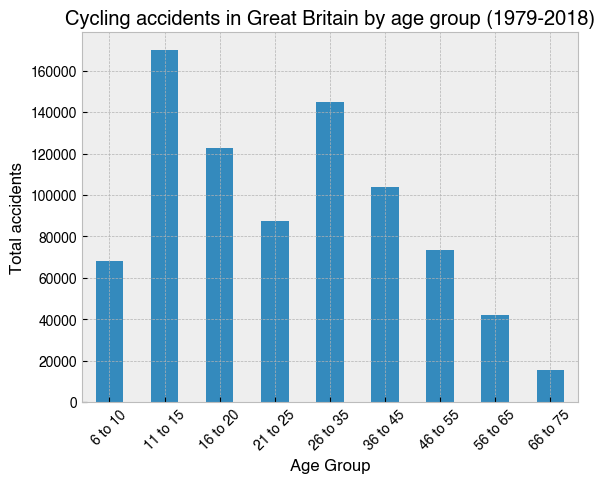
9. Create a bar chart showing how accidents were distributed by Age_Grp
[9]:
# A list of desired orders for the groups.
# Python's default alphanumeric sorting would place '6 to 10'
# between '56 to 65' and '66 to 75'.
group_order = [
    '6 to 10',
    '11 to 15',
    '16 to 20',
    '21 to 25',
    '26 to 35',
    '36 to 45',
    '46 to 55',
    '56 to 65',
    '66 to 75'
]

# Group by Age_Grp and select the Accident_Index column, which has
# unique values for each accident, making it suitable for a .count() operation
ax = (
    df.groupby('Age_Grp')['Accident_Index']
    .count()[group_order]
    .plot(kind='bar', rot=45)
)
ax.set_title('Cycling accidents in Great Britain by age group (1979-2018)')
ax.set_xlabel('Age Group')
ax.set_ylabel('Total accidents');
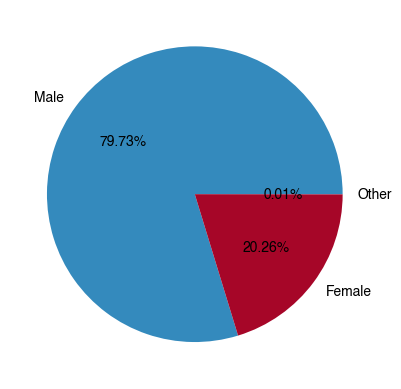
10. Across all accidents, what percentage involved Males, what percentage involved Females, and what percentage involved people identifying as ‘Other’? Show the results in a pie chart.
[10]:
ax = (
    df.Gender.value_counts()
    .plot
    .pie(autopct='%1.2f%%')  # Add percentage text labels
)
ax.set_ylabel('');
11. What was the highest number of vehicles involved in a single accident?
[11]:
# 13, but it is unclear from the data key what counts as a vehicle
df.Number_of_Vehicles.value_counts()
[11]:
2     758784
1      41786
3      24955
4       1861
5        343
6         72
7         30
8         21
9          4
10         3
12         1
13         1
Name: Number_of_Vehicles, dtype: int64
12. What was the highest number of casualties involved in a single accident?
[12]:
# 60
df.Number_of_Casualties.value_counts().sort_index()
[12]:
1     792685
2      32367
3       2227
4        357
5        123
6         54
7         23
8          9
9          5
10         3
12         1
13         5
34         1
60         1
Name: Number_of_Casualties, dtype: int64
13. On which day of the week did the accident with Accident_Index 201443N027074 occur?
[13]:
# Saturday
df.loc[df.Accident_Index=='201443N027074']
[13]:
| Accident_Index | Number_of_Vehicles | Number_of_Casualties | Date | Time | Speed_limit | Road_conditions | Weather_conditions | Day | Road_type | Light_conditions | Gender | Severity | Age_Grp | |
|---|---|---|---|---|---|---|---|---|---|---|---|---|---|---|
| 751599 | 201443N027074 | 2 | 1 | 2014-05-07 | 19:30 | 30.0 | Dry | Clear | Saturday | Single carriageway | Daylight | Male | Serious | 16 to 20 |
[14]:
# Just get the day
df.loc[df.Accident_Index=='201443N027074'].Day
[14]:
751599    Saturday
Name: Day, dtype: object
14. Create a separate DataFrame for all serious accidents that happened on a Sunday in wet road conditions. How many were there?
[15]:
# Create new DataFrame
df2 = df.loc[(
    (df.Severity=='Serious')
    & (df.Day=='Sunday')
    & (df.Road_conditions=='Wet')
)]
df2
[15]:
| Accident_Index | Number_of_Vehicles | Number_of_Casualties | Date | Time | Speed_limit | Road_conditions | Weather_conditions | Day | Road_type | Light_conditions | Gender | Severity | Age_Grp | |
|---|---|---|---|---|---|---|---|---|---|---|---|---|---|---|
| 9 | 197901A7PDD49 | 2 | 1 | 1979-07-01 | 15:15 | 30.0 | Wet | Rain | Sunday | Unknown | Daylight | Male | Serious | 11 to 15 |
| 107 | 197901ALMAE81 | 2 | 1 | 1979-01-21 | 12:00 | 30.0 | Wet | Fog | Sunday | Single carriageway | Daylight | Male | Serious | 56 to 65 |
| 657 | 197901D8LGF35 | 2 | 1 | 1979-08-04 | 11:30 | 30.0 | Wet | Rain | Sunday | Single carriageway | Daylight | Male | Serious | 6 to 10 |
| 1538 | 197901FOJEV59 | 2 | 1 | 1979-06-24 | 09:20 | 30.0 | Wet | Rain | Sunday | Unknown | Daylight | Male | Serious | 46 to 55 |
| 1542 | 197901FOPGC24 | 2 | 1 | 1979-06-24 | 15:30 | 30.0 | Wet | Unknown | Sunday | Unknown | Daylight | Male | Serious | 16 to 20 |
| ... | ... | ... | ... | ... | ... | ... | ... | ... | ... | ... | ... | ... | ... | ... |
| 826325 | 2018521902418 | 2 | 1 | 2018-02-12 | 16:56 | 20.0 | Wet | Rain | Sunday | Single carriageway | Darkness lights lit | Male | Serious | 26 to 35 |
| 826477 | 2018530806661 | 2 | 1 | 2018-07-29 | 18:50 | 30.0 | Wet | Rain | Sunday | Single carriageway | Daylight | Male | Serious | 46 to 55 |
| 827229 | 201863C114718 | 2 | 1 | 2018-09-30 | 15:35 | 30.0 | Wet | Clear | Sunday | Single carriageway | Daylight | Male | Serious | 46 to 55 |
| 827580 | 2018961800246 | 2 | 1 | 2018-07-15 | 11:00 | 60.0 | Wet | Rain | Sunday | Single carriageway | Daylight | Female | Serious | 56 to 65 |
| 827618 | 201897GC01011 | 3 | 1 | 2018-11-25 | 10:30 | 60.0 | Wet | Clear | Sunday | Single carriageway | Daylight | Male | Serious | 56 to 65 |
2621 rows × 14 columns
[16]:
# Get the number of entries
len(df2)
[16]:
2621
15. Create and assign a new `DatetimeIndex <https://pandas.pydata.org/pandas-docs/stable/reference/api/pandas.DatetimeIndex.html>`__ for the DataFrame using the Date and Time columns
[17]:
# Concatenate Date and Time columns to make datetime-like string
# and convert to DateTimeIndex
df.index = pd.DatetimeIndex(df.Date + ' ' + df.Time)
df
[17]:
| Accident_Index | Number_of_Vehicles | Number_of_Casualties | Date | Time | Speed_limit | Road_conditions | Weather_conditions | Day | Road_type | Light_conditions | Gender | Severity | Age_Grp | |
|---|---|---|---|---|---|---|---|---|---|---|---|---|---|---|
| 1979-01-01 18:20:00 | 197901A1SEE71 | 2 | 1 | 1979-01-01 | 18:20 | 50.0 | Snow | Unknown | Monday | Dual carriageway | Darkness lights lit | Male | Serious | 36 to 45 |
| 1979-02-01 09:15:00 | 197901A2JDW40 | 1 | 1 | 1979-02-01 | 09:15 | 30.0 | Snow | Unknown | Tuesday | Unknown | Daylight | Male | Slight | 46 to 55 |
| 1979-04-01 08:45:00 | 197901A4IJV90 | 2 | 1 | 1979-04-01 | 08:45 | 30.0 | Snow | Unknown | Thursday | Unknown | Daylight | Male | Slight | 46 to 55 |
| 1979-04-01 13:40:00 | 197901A4NIE33 | 2 | 1 | 1979-04-01 | 13:40 | 30.0 | Wet | Unknown | Thursday | Unknown | Daylight | Male | Slight | 36 to 45 |
| 1979-04-01 18:50:00 | 197901A4SKO47 | 2 | 1 | 1979-04-01 | 18:50 | 30.0 | Wet | Unknown | Thursday | Unknown | Darkness lights lit | Male | Slight | 46 to 55 |
| ... | ... | ... | ... | ... | ... | ... | ... | ... | ... | ... | ... | ... | ... | ... |
| 2018-02-07 14:55:00 | 2018983118818 | 2 | 1 | 2018-02-07 | 14:55 | 30.0 | Dry | Clear | Monday | Single carriageway | Daylight | Male | Slight | 6 to 10 |
| 2018-07-24 07:45:00 | 2018983119218 | 2 | 1 | 2018-07-24 | 07:45 | 30.0 | Dry | Clear | Tuesday | Single carriageway | Daylight | Male | Serious | 56 to 65 |
| 2018-10-08 13:25:00 | 2018983120618 | 2 | 1 | 2018-10-08 | 13:25 | 20.0 | Dry | Clear | Friday | Single carriageway | Daylight | Male | Serious | 11 to 15 |
| 2018-07-18 21:10:00 | 2018983121918 | 2 | 1 | 2018-07-18 | 21:10 | 30.0 | Dry | Clear | Wednesday | Single carriageway | Daylight | Male | Serious | 46 to 55 |
| 2018-12-20 15:14:00 | 2018983133818 | 2 | 1 | 2018-12-20 | 15:14 | 30.0 | Wet | Rain | Thursday | Single carriageway | Daylight | Male | Serious | 6 to 10 |
827861 rows × 14 columns
16. Add a new column to the DataFrame called long_date. It should contain the correct dates matching the following format.
Wednesday 09 February 2012
[18]:
# Use date formatting codes
df['long_date'] = df.index.strftime('%A %d %B %Y')
df
[18]:
| Accident_Index | Number_of_Vehicles | Number_of_Casualties | Date | Time | Speed_limit | Road_conditions | Weather_conditions | Day | Road_type | Light_conditions | Gender | Severity | Age_Grp | long_date | |
|---|---|---|---|---|---|---|---|---|---|---|---|---|---|---|---|
| 1979-01-01 18:20:00 | 197901A1SEE71 | 2 | 1 | 1979-01-01 | 18:20 | 50.0 | Snow | Unknown | Monday | Dual carriageway | Darkness lights lit | Male | Serious | 36 to 45 | Monday 01 January 1979 |
| 1979-02-01 09:15:00 | 197901A2JDW40 | 1 | 1 | 1979-02-01 | 09:15 | 30.0 | Snow | Unknown | Tuesday | Unknown | Daylight | Male | Slight | 46 to 55 | Thursday 01 February 1979 |
| 1979-04-01 08:45:00 | 197901A4IJV90 | 2 | 1 | 1979-04-01 | 08:45 | 30.0 | Snow | Unknown | Thursday | Unknown | Daylight | Male | Slight | 46 to 55 | Sunday 01 April 1979 |
| 1979-04-01 13:40:00 | 197901A4NIE33 | 2 | 1 | 1979-04-01 | 13:40 | 30.0 | Wet | Unknown | Thursday | Unknown | Daylight | Male | Slight | 36 to 45 | Sunday 01 April 1979 |
| 1979-04-01 18:50:00 | 197901A4SKO47 | 2 | 1 | 1979-04-01 | 18:50 | 30.0 | Wet | Unknown | Thursday | Unknown | Darkness lights lit | Male | Slight | 46 to 55 | Sunday 01 April 1979 |
| ... | ... | ... | ... | ... | ... | ... | ... | ... | ... | ... | ... | ... | ... | ... | ... |
| 2018-02-07 14:55:00 | 2018983118818 | 2 | 1 | 2018-02-07 | 14:55 | 30.0 | Dry | Clear | Monday | Single carriageway | Daylight | Male | Slight | 6 to 10 | Wednesday 07 February 2018 |
| 2018-07-24 07:45:00 | 2018983119218 | 2 | 1 | 2018-07-24 | 07:45 | 30.0 | Dry | Clear | Tuesday | Single carriageway | Daylight | Male | Serious | 56 to 65 | Tuesday 24 July 2018 |
| 2018-10-08 13:25:00 | 2018983120618 | 2 | 1 | 2018-10-08 | 13:25 | 20.0 | Dry | Clear | Friday | Single carriageway | Daylight | Male | Serious | 11 to 15 | Monday 08 October 2018 |
| 2018-07-18 21:10:00 | 2018983121918 | 2 | 1 | 2018-07-18 | 21:10 | 30.0 | Dry | Clear | Wednesday | Single carriageway | Daylight | Male | Serious | 46 to 55 | Wednesday 18 July 2018 |
| 2018-12-20 15:14:00 | 2018983133818 | 2 | 1 | 2018-12-20 | 15:14 | 30.0 | Wet | Rain | Thursday | Single carriageway | Daylight | Male | Serious | 6 to 10 | Thursday 20 December 2018 |
827861 rows × 15 columns
17. What is the worst day on record in terms of the number of accidents that were reported?
[19]:
# 1983-11-25
df.groupby(df.index.date)['Accident_Index'].count().sort_values()
[19]:
2010-12-25      2
2009-01-01      2
2017-10-12      3
2003-01-01      3
2007-12-25      3
             ...
1984-07-23    152
1983-07-21    154
1983-07-25    154
1989-07-26    161
1983-11-25    166
Name: Accident_Index, Length: 14609, dtype: int64
[20]:
# Get the long format date
df.groupby(df.long_date)['Accident_Index'].count().sort_values().index[-1]
[20]:
'Friday 25 November 1983'
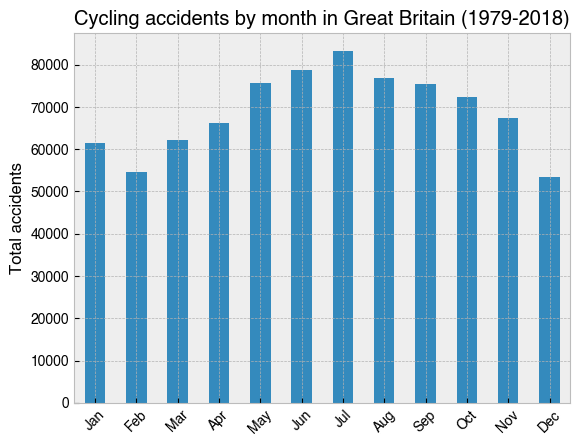
18. Make a bar chart showing total accidents by month of the year
[21]:
months = ['Jan', 'Feb', 'Mar', 'Apr', 'May', 'Jun', 'Jul', 'Aug', 'Sep', 'Oct', 'Nov', 'Dec']
ax = (
    df.groupby(df.index.month)['Accident_Index']
    .count()
    .plot(kind='bar')
)
ax.set_xticklabels(months, rotation=45)
ax.set_ylabel('Total accidents')
ax.set_title('Cycling accidents by month in Great Britain (1979-2018)');
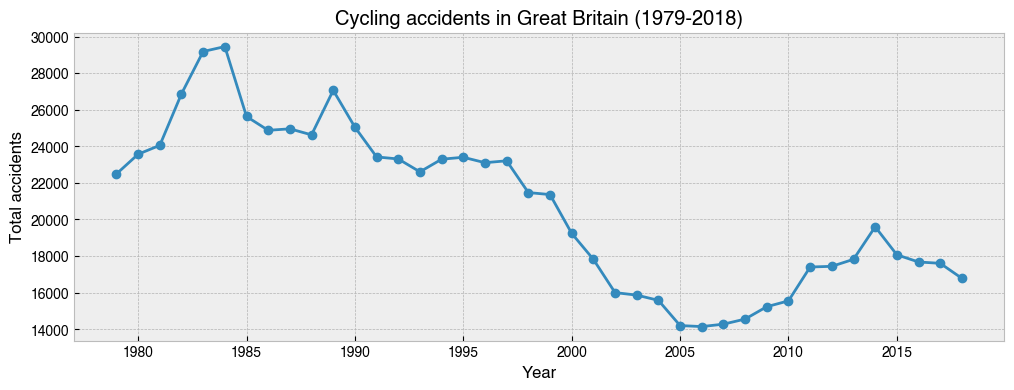
19. Make a line graph showing the total number of accidents that occurred each year from 1979-2018. Have accidents declined overall? In which years did the most and least cycling accidents occur?
[22]:
# 1984, 2006
ax = (
    df.groupby(df.index.year)['Accident_Index']
    .count()
    .plot(kind='line', marker='o', figsize=(12, 4))
)
ax.set_ylabel('Total accidents')
ax.set_xlabel('Year')
ax.set_title('Cycling accidents in Great Britain (1979-2018)');
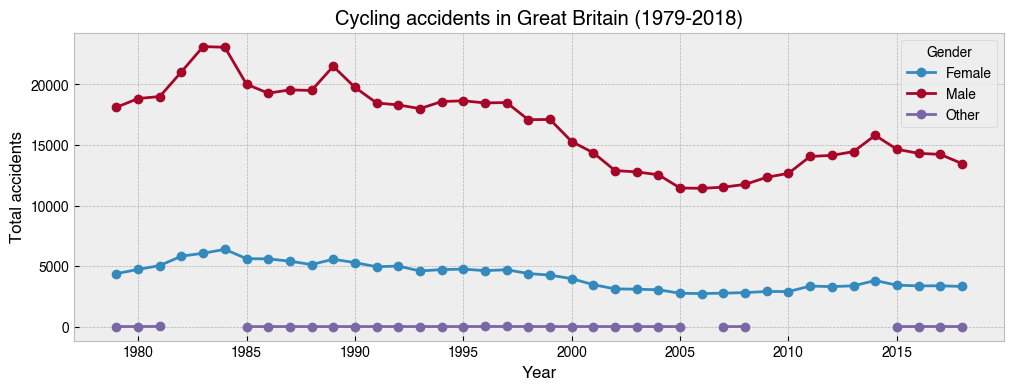
20. Repeat the above, but this time with separate lines for ``Gender``
[23]:
ax = (
    df.groupby([df.index.year, 'Gender'])['Accident_Index']  # Add Gender to the groupby
    .count()
    .unstack()
    .plot(kind='line', marker='o', figsize=(12, 4))
)
ax.set_ylabel('Total accidents')
ax.set_xlabel('Year')
ax.set_title('Cycling accidents in Great Britain (1979-2018)');
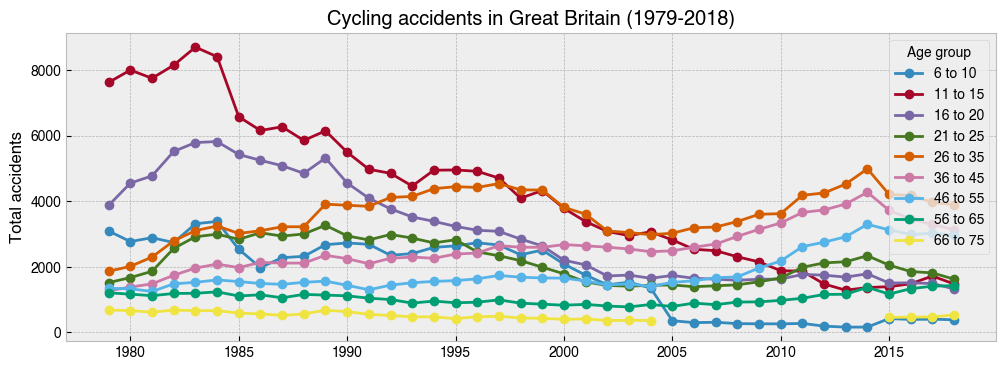
21. Repeat the above, but this time with separate lines for ``Age_Grp``
[24]:
group_order = [
    '6 to 10',
    '11 to 15',
    '16 to 20',
    '21 to 25',
    '26 to 35',
    '36 to 45',
    '46 to 55',
    '56 to 65',
    '66 to 75'
]
ax = (
    df.groupby([df.index.year, 'Age_Grp'])['Accident_Index']  # Add Age_Grp to the groupby
    .count()
    .unstack()[group_order]
    .plot(kind='line', marker='o', figsize=(12, 4))
)
ax.set_ylabel('Total accidents')
ax.set_title('Cycling accidents in Great Britain (1979-2018)')
ax.legend(title='Age group');
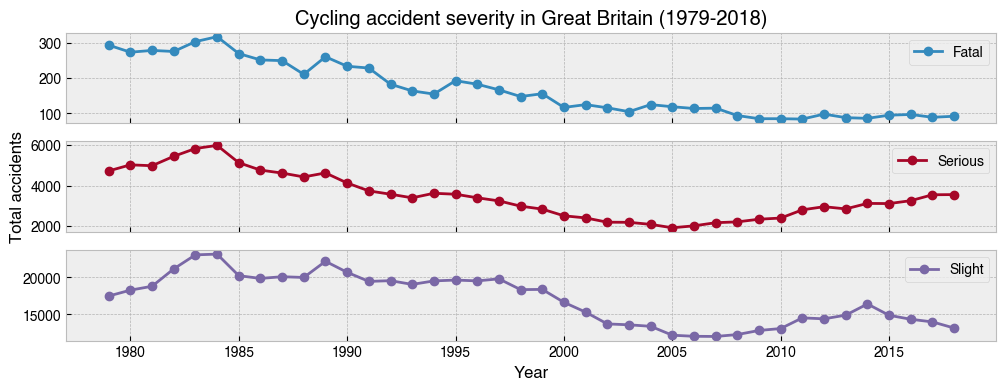
22. Repeat the above, but this time with separate subplots for ``Severity``
[25]:
axs = (
    df.groupby([df.index.year, 'Severity'])['Accident_Index']  # Add Severity to the groupby
    .count()
    .unstack()
    .plot(kind='line', marker='o', figsize=(12, 4), subplots=True)
)
axs[1].set_ylabel('Total accidents')
axs[2].set_xlabel('Year')
axs[0].set_title('Cycling accident severity in Great Britain (1979-2018)');
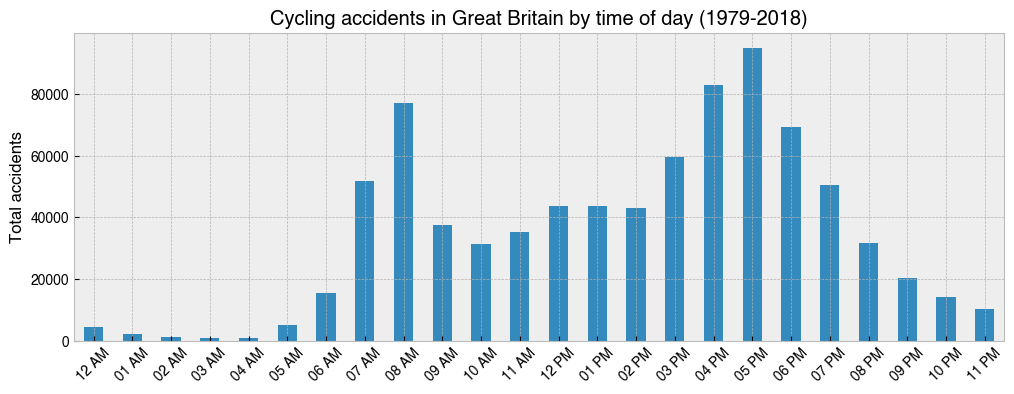
23. Make a bar chart showing the total number of accidents for each hour in the day from 1979-2018
[26]:
import datetime

ax = (
    df.groupby(df.index.hour)['Accident_Index']
    .count()
    .plot(kind='bar', figsize=(12, 4))
)
ax.set_ylabel('Total accidents')
ax.set_title('Cycling accidents in Great Britain by time of day (1979-2018)')
hours = [datetime.time(i).strftime('%I %p') for i in range(24)]  # Create xticklabels
ax.set_xticklabels(hours, rotation=45);
24. As above, but with stacked bars using different colours for each day of the week
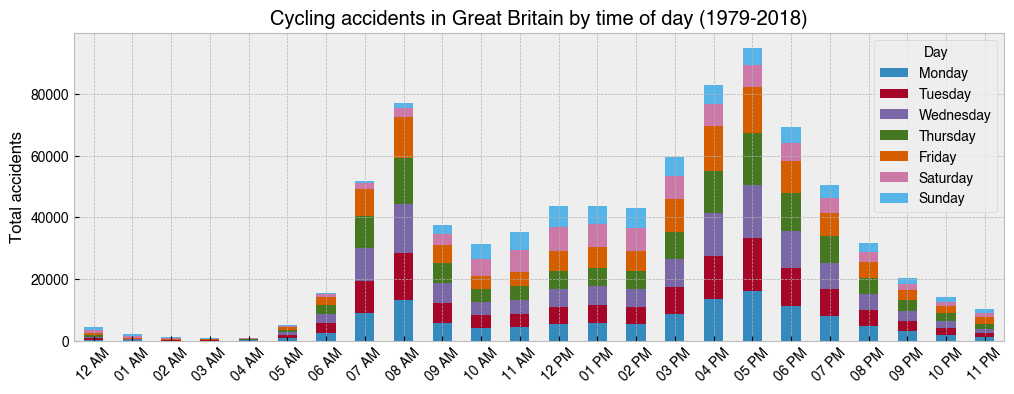
[27]:
import datetime

group_order = ['Monday', 'Tuesday', 'Wednesday', 'Thursday', 'Friday', 'Saturday', 'Sunday']

ax = (
    df.groupby([df.index.hour, 'Day'])['Accident_Index']
    .count()
    .unstack()[group_order]
    .plot(kind='bar', figsize=(12, 4), stacked=True)  # Use stacked option
)
ax.set_ylabel('Total accidents')
ax.set_title('Cycling accidents in Great Britain by time of day (1979-2018)')
hours = [datetime.time(i).strftime('%I %p') for i in range(24)]
ax.set_xticklabels(hours, rotation=45);
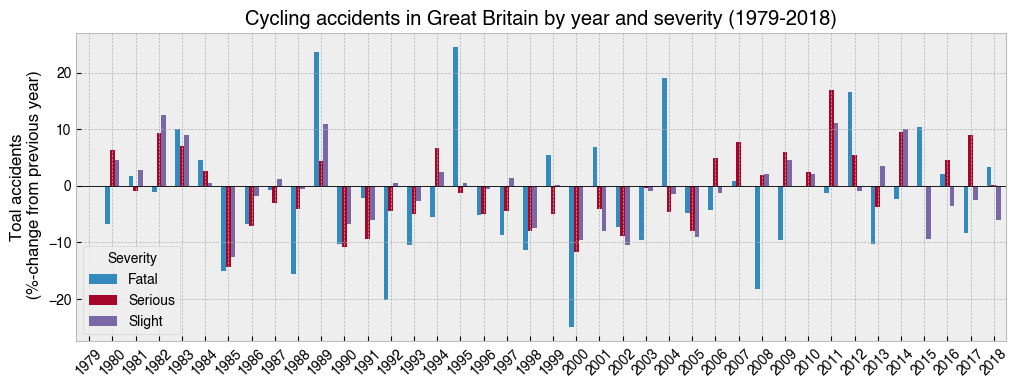
25. Make a bar chart showing the year-on-year percentage change for accidents with different coloured bars for each Severity
[28]:
ax = (
    df.groupby([df.index.year, 'Severity'])['Accident_Index']
    .count()
    .unstack()
    .pct_change()  # Calculates percentage change from previous value
    .mul(100)  # Times 100 to get percent
    .plot
    .bar(figsize=(12, 4), rot=45, width=.6)
)

ax.axhline(0, 0, 1, lw=.6, c='k')
ax.set_ylabel('Toal accidents\n (%-change from previous year)')
ax.set_title('Cycling accidents in Great Britain by year and severity (1979-2018)');