Week 0 - Exercises
This week there is some recommended reading and practical work that builds on what we covered in the first session.
The article I would like you to read, and you can access it by clicking on the blue link, is called How long does it take to learn Python? This is an accessible read that explores reasons for learning Python, what it means to learn Python, how you can keep track of progress, factors that may influence your journey, how long it takes, and resources that may help speed your learning.
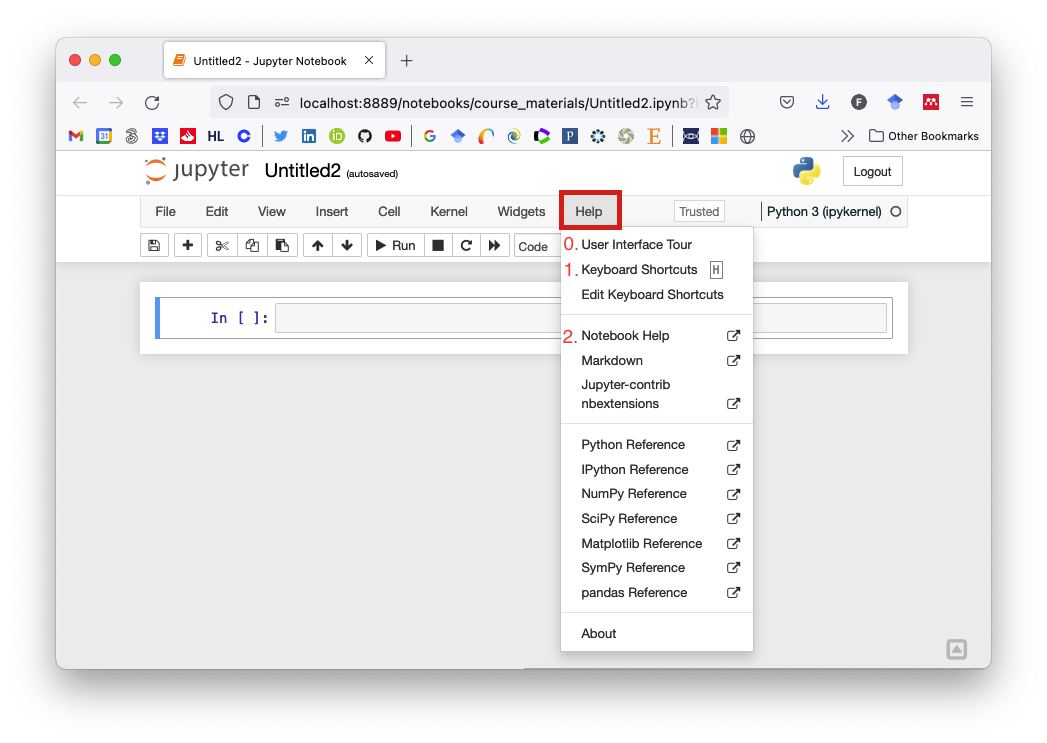
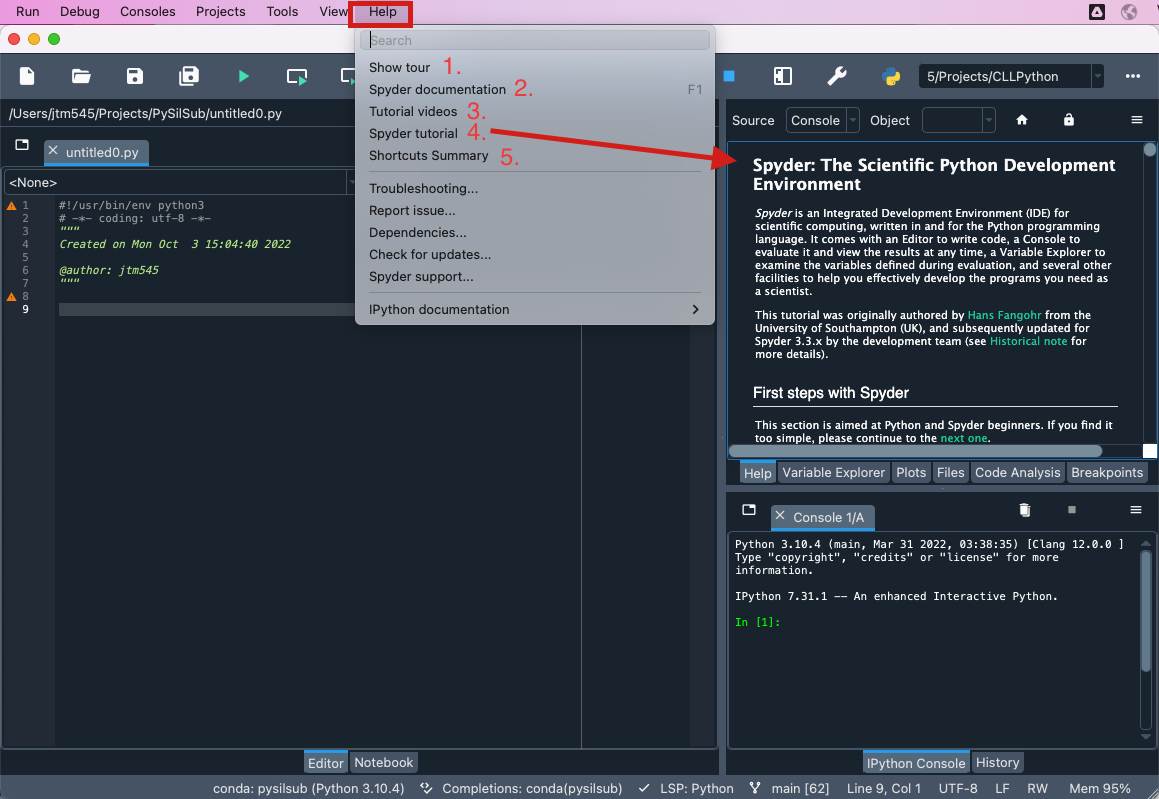
The rest of your efforts this week should be directed towards familiarising yourself with Jupyter and Spyder. Both of these software have a Help menu, which is a great place to begin. You are bound to encounter technical jargon and concepts that you don’t understand, but don’t worry! Just make a note, and remember to ask me about it when you get the chance.
By the way, don’t worry if you think you have “broken” any of the documents provided in the course materials. Just download a fresh copy!
Jupyter
Take the
User Interface TourHave a look at the
Keyboard ShortcutsRead the
Notebook Helppages
Spyder
Take the Spyder tour
Review the Spyder documentation
Watch Parts 1, 2 and 3 of the “First steps with Spyder” tutorial videos
Skim through the Spyder tutorial (you can work through this at you own pace for extra practice).
Look at the Shortcut summary
Exercise 1 - An improved guessing game
Let’s have another look at the number guessing game script. With an instruction like “Enter any number:”, a naive user could be forgiven for entering something like 78.3, which is, after all, a number.
But if a decimal number is entered, the program throws a cryptic error message. See for yourself by clicking on the cell below, pressing Shift+Enter to execute the code, and then entering a decimal number instead of a whole number. Don’t worry about the error message for now. Suffice to say that the computer is unable to carry out the instruction!
It would be better if the user knew not to enter a decimal number. Change the code below so that when it is executed the instruction will read “Enter a whole number between 0 and 100:”
Hint - look at the first input function
If you found that easy, try changing the message at the end of the program to make it more congratulatory!
[3]:
"""Play a number guessing game."""

import random


# Generate a random number between 0 and 100
n = random.randrange(1, 100)

# Ask the user to have a guess
guess = int(input("Enter a whole number between 0 and 100: "))

# Keep asking until the guess is right
while n != guess:
    if guess < n:
        print("Too low")
        guess = int(input("Enter number again: "))
    elif guess > n:
        print("Too high!")
        guess = int(input("Enter number again: "))
    else:
        break

# Tell user they guessed right
print("CONGRATULATIONS!!! You guessed it right!!!")
Enter a whole number between 0 and 100: 50
Too high!
Enter number again: 25
Too high!
Enter number again: 10
Too low
Enter number again: 15
Too high!
Enter number again: 13
Too high!
Enter number again: 12
Too high!
Enter number again: 11
CONGRATULATIONS!!! You guessed it right!!!
Exercise 2 - Sensible temperatures
Remember the Fahrenheit to Celsius program?
Depending on the Fahrenheit value that the user provides, the reported temperature in degrees Celsius may be given with much more precision than we need. For example, if I enter 75.5 as a temperature in Fahrenheit, the result in Celsius is reported as 24.166666666666668. What need had I of this precision?
Can you figure out a way to round the Celsius value to two decimal places? We haven’t learned how to do this yet, so it may prove a tricky one. You may wish to try Googling “How to round numbers in Python”.
Good luck!
[1]:
"""Convert Fahrenheit to Celsius."""

# Ask user to enter a temperature in Fahrenheit
temp = float(input("Enter temperature in Fahrenheit: "))

# Convert to celsius
celsius = (temp - 32) * (5 / 9)

print(f"{temp} degrees Fahrenheit is equal to {celsius} degrees Celsius.")

# SOLUTION: Round to two decimal places with round(celsius, 2)
print(f"{temp} degrees Fahrenheit is equal to {round(celsius, 2)} degrees Celsius.")
Enter temperature in Fahrenheit: 75.5
75.5 degrees Fahrenheit is equal to 24.166666666666668 degrees Celsius.
75.5 degrees Fahrenheit is equal to 24.17 degrees Celsius.
Exercise 3 - Think it like Euclid did
Have another look at Euclid’s algorithm (from this week’s presentation slides), which is used to find the highest common divisor of two numbers (i.e., the highest number that divides them both without a remainder).
For each of the following starting points, mentally assign the numbers to A and B and then work through the stages of the algorithm to find the highest common divisor. You can use a pen and paper if it makes things easier.
A = 4,B = 2A = 8,B = 16A = 49,B = 35A = 240,B = 30

Note: The > symbol means greater than, and the ← symbol means “assign the result of the expression on the right to the variable on the left”
SOLUTIONS:
Highest common divisor of 2 and 4 is 2
Highest common divisor of 8 and 16 is 8
Highest common divisor of 49 and 35 is 7
Highest common divisor of 240 and 30 is 30